




An SEO audit is only as valuable as the insights it uncovers and the actions it recommends. But what separates a basic checklist from a report that actually drives results?
This SEO audit report example guide breaks down real, anonymized reports to show what a strong audit looks like.
From identifying technical issues and content gaps to prioritizing fixes that can improve rankings, traffic, and conversions.
Relatable Read: How to Choose an SEO Company: 11 Questions to Ask Before Signing
What Makes an SEO Audit Report “Good” in the First Place?
An SEO audit report is a complete analysis of all the factors that influence a website’s ranking and conversion in organic search, including user experience, backlinks, technical health, and content quality.
That is the definition found in textbooks.
Here’s the practical one: an effective audit explains what’s wrong, why it affects the company, and what to do first. A wall of computerized scores with no judgment is a terrible one.
The difference soon becomes apparent. 200 “issues” can be produced in 10 minutes using programs like Ahrefs and Screaming Frog. That scan can be performed by anybody.
The human layer at the top, which determines which of those 200 concerns are noise and which truly cost the company money, is what distinguishes a true audit.
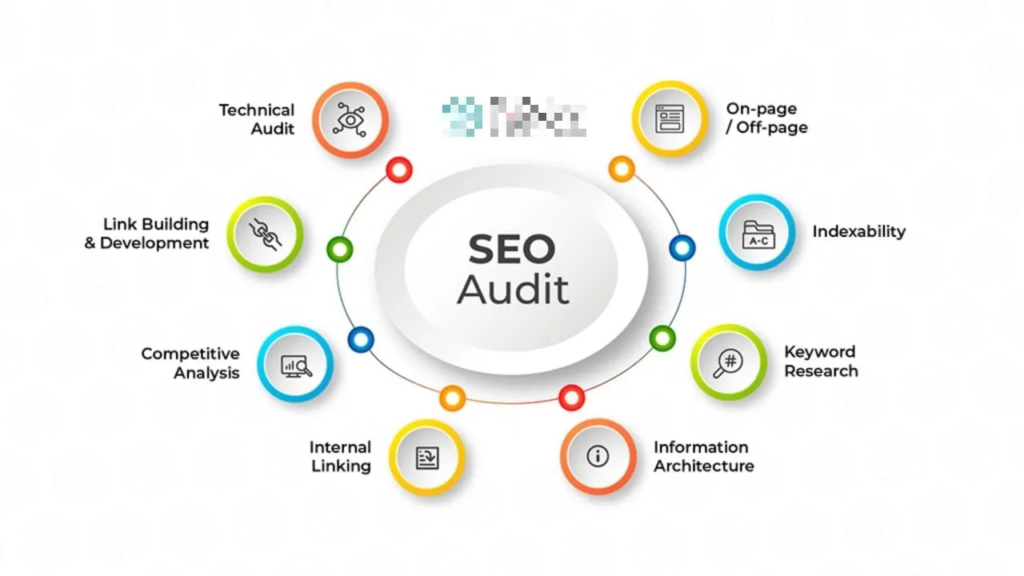
What Should an SEO Audit Report Actually Include?
A complete audit generally walks through these sections, in roughly this order:
| Section | What It Should Answer | Example Finding |
| Executive Summary | What’s broken, what’s the impact, what’s next | 3 P1 issues blocking revenue growth |
| Technical SEO | Can search engines crawl and index the site properly? | 40% of blog URLs blocked by robots.txt |
| On-Page SEO | Are individual pages optimized for intent and relevance? | Duplicate title tags across product pages |
| Content | Is the content actually earning rankings and conversions? | 3 articles cannibalizing the same keyword |
| Internal Linking | Is authority flowing to the pages that matter? | 12 commercial pages have zero internal links |
| Backlinks | Is the site’s authority profile healthy? | Losing more referring domains than gaining |
| Keyword Visibility | Where does the site rank, and where’s the upside? | 18 keywords stuck on page 2 |
| UX / Core Web Vitals | Is the site fast and usable enough to convert? | Mobile LCP over 4 seconds site-wide |
| Competitor Insights | How does the site compare to who’s actually winning? | Competitor covers 60% more topic clusters |
| Prioritized Recommendations | What should be fixed first? | P0/P1/P2/P3 breakdown |
| Roadmap | How does this get implemented? | 90-day phased plan |
| KPIs | How will we know it worked? | Organic leads, not just traffic |
The Executive Summary: Where Most Reports Fail
The executive summary should give all the information a person needs to know about an audit, even if they don’t read anything else. This goes beyond simply stating “SEO health: 68/100.” It also includes identifying the most significant issues, opportunities, and business impact.
Here’s what that looked like for this site:
| Finding | Impact | Priority | Recommended Action |
| Duplicate title tags on 37 pages | Medium | P1 | Rewrite titles per page intent |
| 12 orphaned commercial pages | High | P1 | Add contextual internal links |
| Mobile LCP averaging 4.2s | High | P1 | Optimize scripts and image weight |
| Thin, overlapping blog content | Medium | P2 | Consolidate into pillar pages |
Relatable Read: How Much Does SEO Cost in 2026?
Technical SEO Findings
Everything else is built on top of technical problems. No amount of content or backlink building is important if search engines are unable to properly crawl or index a page.
- Crawlability: A subdirectory of blog content that had been moved six months prior was inadvertently blocked by the robots.txt file, which had not been updated following the migration, according to the audit. As a result, almost 40% of blog URLs were not visible to crawlers.
- Indexing: Approximately 60 URLs of old campaign landing pages with no actual content and thin filter pages were indexed when they shouldn’t have been. In the meantime, several high-value comparison pages were in Search Console’s “crawled, not indexed” condition, most likely as a result of poor internal linking (more on that below).
- Site Structure: Four or five clicks out from the homepage were some of the pages with the best conversion rates. Burying commercial pages that are deep sends the wrong message because search engines typically interpret click depth as a signal of relative importance.
- Status codes and redirects: Due to a rebrand two years earlier, the website had amassed multiple redirect chains, which are pages that reroute to a redirect, sometimes three hops long. Each hop somewhat slows down site load and dilutes link equity.
The report format was the same for each of these: Proof → Why it matters → Suggestion → Importance.
A list of issues becomes something that a developer or content team can actually address thanks to its framework.

On-Page SEO Audit Example
To enhance search engine rankings and user experience, an on-page SEO audit assesses individual site pages.
The example of an on-page SEO audit:
- Target Keyword: “best coffee beans”
- Search Intent: Informational / Commercial (users looking for a list of top-rated coffee beans to buy)
Content Findings: Where the Real Money Usually Is
Cannibalization tends to hide in this area, which frequently has the most commercial impact.
In this instance, a crucial product feature was the focus of three different blog entries that were all aiming for almost the same keyword cluster.
Instead of supporting a single, powerful page, they were vying with one another in search results.
- Before: Three thin, overlapping articles that divided authority and traffic.
- Recommendation: It is advised that the two weaker URLs be redirected to the stronger one in order to create a single authoritative resource.
- Expected outcome: Expected results include improved ranks for the main keyword over time, stronger internal linking around one target rather than three, and a clearer signal to search engines about what the page is actually about.
Internal Linking Audit
Internal links inform search engines about the important content on a website. Even if a page is one that the company is very interested in, having no internal links leading to it is a clear (if inadvertent) indication that it is irrelevant.
The audit found 12 commercial landing pages with only one or two internal links each, most of them buried in a footer.
In the meantime, some of the site’s most authoritative blog entries, which also received the most organic traffic and backlinks, had no links to any commercial pages.
The solution was simple in theory, if not in practice: instead of utilizing generic “click here” links, create a purposeful path from high-authority informational content to pertinent commercial pages using natural, descriptive anchor text.
Learn more: What is an SEO Funnel and How to Build One?
Backlink and Off-Page Findings
There is more to an excellent backlink section than just the number of referring domains. The site was losing more referring domains than it was gaining over the previous ninety days, according to this audit, which examined link quality, relevancy, and anchor-text distribution.
This pattern had gone unreported because raw traffic was still increasing.
A competitor gap analysis revealed that two immediate rivals were consistently receiving links from trade journals and comparison websites that the target site had never been referenced on.
This is a clear, particular opportunity as opposed to an ambiguous “build more backlinks” suggestion.
Core Web Vitals and Page Experience
Across commercial templates, Mobile Largest Contentful Paint (LCP) averaged 4.2 seconds, significantly longer than Google’s suggested 2.5-second cutoff. Unoptimized hero images and a third-party script loading render-blocking resources were found to be the root culprit.
Since that’s what gets corrected, each performance issue was linked to a particular template rather than the entire website: Issue → impacted template → suggested solution → priority.
Keyword and Organic Visibility Analysis
This is when the discrepancy between traffic and conversions began to make sense. 18 high-intent, commercial keywords were found to rank between positions 8 and 20 in the audit; they were not prominent enough to generate actual volume, but they were close enough to page one to be winnable.
Importantly, low-intent, informational terms accounted for the majority of the site’s traffic growth, whereas commercial keywords that genuinely generated demo requests either stagnated or decreased.
The wrong pages were winning, which is precisely why traffic increased although pipeline did not.
Competitor Gap Analysis
In addition to several comparison-style pages (“X vs. Y”) that were obviously driving competitor traffic in the consideration stage of the funnel, the site lacked coverage on entire topic clusters that the rivals consistently ranked for when compared to two direct competitors.
Ready to Rank Higher? Explore MonsterClaw’s Professional SEO Services
Prioritizing Issues by Impact
Every finding in the audit ultimately fed into one prioritization framework: Business impact × SEO impact × Implementation feasibility.
| Priority | Issue | Impact | Effort | Owner |
| P0 | Incorrect canonical tags | High | Medium | Developer |
| P1 | Weak commercial-page content | High | Medium | Content team |
| P1 | Orphaned pages | High | Low | SEO team |
| P2 | Declining article refreshes | Medium | Medium | Content team |
| P3 | Image alt-text cleanup | Low | Low | Content team |
Relatable Read: What is SEO Marketing and How Does It Work? (Complete Guide)
The 90-Day Action Plan
- Days 1–30: Technical foundation: correct canonical tags, deindex the thin filter pages, fix the robots.txt block, and resolve redirect chains.
- Days 31–60: Material and internal linking: Build internal links from high-authority pages to commercial ones, update deteriorating material, and combine the cannibalized pieces.
- Days 61–90: Growth: Fill in the gaps in the most valuable competitor keywords, look for pertinent backlink chances, and enter untapped topic clusters.
What a Bad SEO Audit Report Looks Like, for Contrast
It’s worth naming the anti-pattern directly, since most people have seen one:
- A list of 100+ “issues” with no prioritization at all
- Recommendations with no supporting evidence
- Heavy focus on keyword density, which stopped mattering years ago
- Traffic numbers reported with zero business context
- Automated tool scores presented as the entire diagnosis
- No page-level or template-level specificity
- No distinction between what’s critical and what’s cosmetic
- No roadmap – just a list, handed over with no plan for implementation
If a report checks more than one or two of these boxes, treat it as a starting point at best, not a finished diagnosis.
A Reusable SEO Audit Report Template
For anyone building their own version, this structure holds up across most industries and site types:
- Executive Summary
- Business and SEO Objectives
- Technical SEO
- Indexation and Crawlability
- On-Page SEO
- Content
- Internal Linking
- Off-Page SEO
- Performance and Core Web Vitals
- Keyword Visibility
- Competitor Analysis
- Prioritized Issues
- 90-Day Roadmap
- KPIs and Measurement Plan
Relatable Read: Roofing SEO: The Complete Guide to Ranking #1 and Getting More Leads in 2026
What “Good” Actually Comes Down To?
A good SEO audit doesn’t just list what’s wrong. It explains what’s wrong, why it matters to the business, what should be done about it, how urgently, and how success will be tracked afterward.
Anything short of that is a scan report with a nicer cover page.
If you want a version of this built for your own site with the same evidence-based, prioritized structure, then MonsterClaw’s free SEO audit walks through exactly this process, tailored to your actual data instead of a generic template.
Frequently Asked Questions (FAQs)
Technical SEO, on-page SEO, content, backlinks, site speed, indexing, and unambiguous suggestions should all be covered.
With client information anonymised, it contains genuine findings, supporting data, issue prioritization, and useful recommendations.
While retaining relevant SEO data and conclusions, remove the client’s name, website, contact information, and other identifiable facts.
Sort problems according to their influence on SEO, business value, urgency, and the amount of work needed to resolve them.
A well-written report explains the problem, why it is important, and how to solve it.


