



- A. Google Ads creates them based on existing ad copy, landing pages, and extensions
- B. Google Ads creates them based on existing high-performing ad copy
- C. Google Ads mixes and matches headlines and description lines that have been provided
- D. Google Ads mixes and matches headlines and URLs that have been provided
Correct Answer: C. Google Ads mixes and matches headlines and description lines that have been provided
The trend of responsive ads is nothing new and has been growing over the past few years.
The key benefit of responsive ads is that they work for all devices. Converts more traffic from different devices at the same time.

Several major search engines — Google, Bing, Yahoo — and mobile app search engines — Appbrain, Cense, and Fonepulse — are integrating responsive ads.
Responsive ads also allow search engines to measure ad performance better and better understand their potential audience. They also conduct testing with real users on responsive ads to see if it’s feasible to be used as part of the entire journey from search to buying a product or a service.
The idea for responsive ads is to present the user with one ad at a time, and that each ad is also a “punchline” to the other ads which appear after the first.
How Does Google AdSense Generate Responsive Search Ads?
Google Ads generates a responsive search ad by mixing and matching the headlines and descriptions you provide, then using machine learning to test different combinations and serve whichever one performs best for each search. You don’t write one fixed ad. You provide the raw materials, up to 15 headlines and 4 descriptions, and Google assembles and tests the combinations for you, continuously, for as long as the ad runs.
This is a fundamentally different model from the expanded text ads RSAs replaced. An expanded text ad was one fixed message. A responsive search ad is closer to a large, ongoing experiment, one that adjusts itself based on the exact search query, the device someone’s using, and their past behavior, without you manually running a single A/B test.
Here’s exactly how that generation process works, how many combinations it’s actually testing, and how to set one up correctly.
Google has developed a system to use the page where your page loads to show a mobile ad.
The mobile ad is then placed in the same spot on the page.
This can be set to:
- Display only on desktop
- Display on both desktop and mobile
- Display only on mobile
- Display on mobile and desktop simultaneously
It is recommended to run responsive ads on one page and not a whole mobile ad campaign on multiple pages.
The functionality is still in testing, but Google says it should become available in the next month or two.
A recent study shows that 48.3% of marketers believe the new tracking system (Mozilla, Chrome, Safari, etc. announced that they are saying goodbye to tracking cookies) will affect the paid ads market. You can see a detailed study here.
How to Generate Responsive Search Ads?
If you’d like to learn how to generate responsive search ads, you can download the Google AdSense for Search Guides guide.
After downloading, select the ‘Mobile Advertising’ tab and search for ‘responsive search ads’.
You can find the ‘Responsive Search Ads Platform‘ and ‘Mobile ads’ settings on the mobile page.
You’ll find that your business should be limited to displaying ads in their responsive format, as only desktop ads can be interactive.
Check this screen to see the different formats that are supported for desktop and mobile.
Step 1:
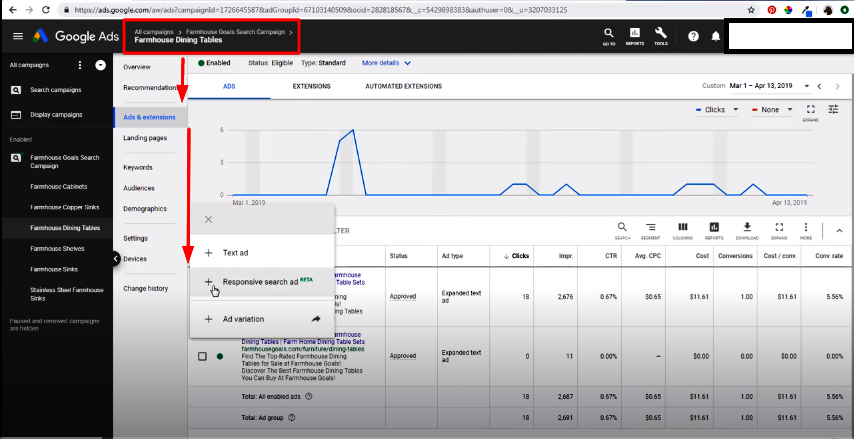
Step 2
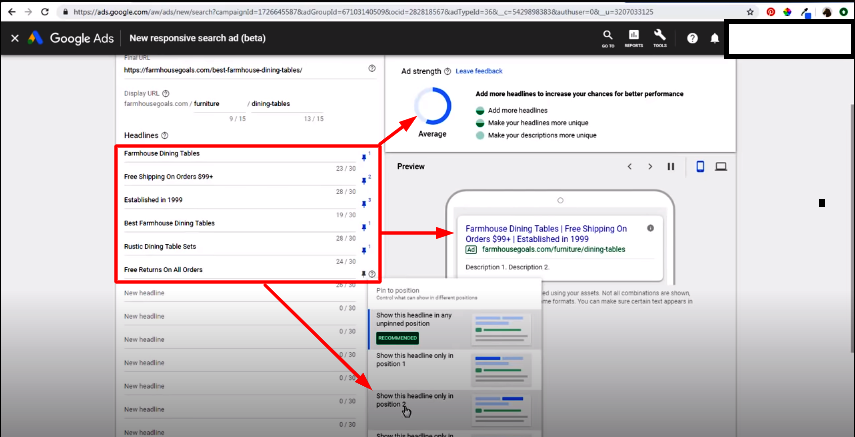
Step 3:
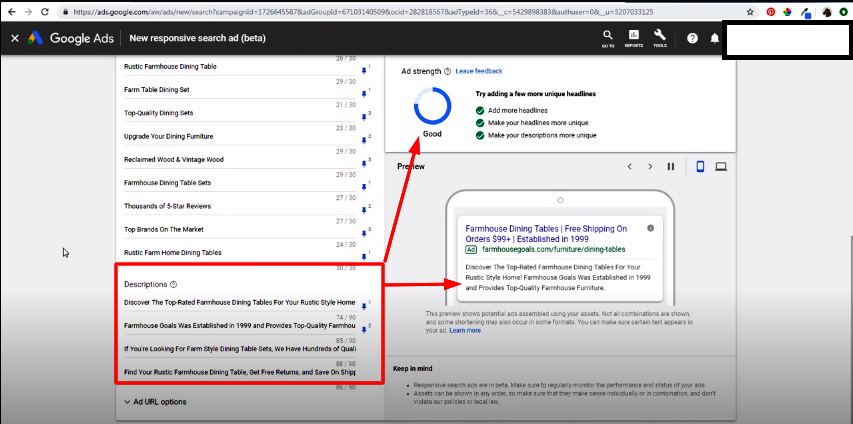
Final Step: Waiting for Approval and Monitoring Performance
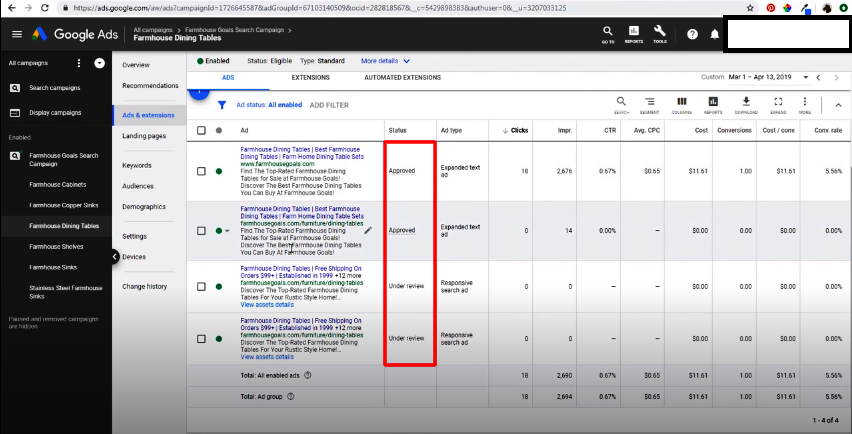
Customizing Your Responsive Search Ads
To customize your ads, choose the ‘Display format‘ and ‘Mobile display format’ settings.
In the ‘Adjust text‘ section, you can make changes to the text that appears on the ad, including several different options:
Headline type
- Text
- Link
- Social share
This option may be necessary to use if you wish to display your responsive search ads on social media sites.
You can also select the filter options to show only responsive search ads, ad formats, and ad types.
Finally, you’ll need to choose the image you want to use, as that is what will appear after your responsive ad appears.
Note: It is important to create the ad using the correct image that conforms to the Google Image Policy.
To add additional images to your ad, navigate to the ‘Add to Google’ page, select the photo you want, and then click ‘Update image.’
A well-optimized landing page is equally important for ad performance, and reliable Dev & IT Services help ensure pages load quickly and provide a smooth user experience after the click.
What Assets Do You Actually Provide?
You give Google Ads two pools of text to work with. Headlines, up to 15 of them, each capped at 30 characters. Descriptions, up to 4 of them, each capped at 90 characters. You can also set a display path, up to two 15-character segments appended to your domain in the visible URL.
When the ad actually serves, Google Ads doesn’t show all 15 headlines and all 4 descriptions at once. It selects up to 3 headlines and up to 2 descriptions for that specific impression, in whatever order it predicts will perform best for that specific searcher.
How Many Combinations Does Google Actually Test?
With the maximum of 15 headlines and 4 descriptions, Google Ads can generate up to 43,680 unique ad combinations from a single responsive search ad, a figure commonly cited in Google’s own training material. Here’s the logic behind a number that size. Selecting 3 headlines out of 15, where order matters, since headline positions 1, 2, and 3 all display differently, produces 15 × 14 × 13 possible orderings.
Selecting 2 descriptions out of 4, where order also matters, produces 4 × 3 possible orderings. Multiply the two together, and you get a number in the tens of thousands from a single ad’s worth of input.
Worth being direct about one thing: if you search around, you’ll find slightly different totals cited by different sources, some closer to 32,000, some closer to 36,000, depending on exactly which assumptions they build into the calculation.
The takeaway that actually matters isn’t the precise digit; it’s the scale. You’re not writing one ad. You’re seeding an experiment with tens of thousands of possible variations, and Google Ads never tests them evenly or randomly.
How Does Google Decide Which Combination to Show?
Google Ads uses machine learning to test combinations against real auctions, then increasingly favors whichever combinations perform best for a given context, rather than rotating through all possible combinations equally. This is the part that actually answers “how does it generate them,” and it’s the part the old version of this page never explained.
The system weighs the exact search query someone typed, since it favors headlines and descriptions that closely match those specific words, sometimes bolding the matching text automatically. It weighs the device someone’s searching from, since a combination that performs well on mobile isn’t guaranteed to perform equally well on desktop. It weighs a person’s past browsing and search behavior, to the extent Google’s signals allow. And critically, it weighs actual performance data as it accumulates, meaning a combination that starts getting more clicks and conversions gets served more often going forward, while weaker combinations get tested less over time.
This is why two people searching the same keyword can see genuinely different versions of your ad. The system isn’t showing “your ad.” It’s showing the specific combination it currently predicts will perform best for that person, in that moment, on that device.
What Does Pinning Actually Do, and When Should You Use It?
Pinning locks a specific headline or description into a specific position, so it always appears in every version of the ad, instead of being tested and rotated like the rest of your assets. This gives you control, but that control comes at a direct cost to how much Google can actually test.
The tradeoff is steep and worth knowing the real numbers on. Pinning a single headline cuts the number of combinations Google can test by more than 75%. Pinning two headlines cuts it by roughly 99.5%, leaving almost no room for the machine learning system to find a better-performing variation than the one you’ve locked in.
That doesn’t mean pinning is a mistake. Legal disclaimers, a required brand name, or a specific regulatory phrase sometimes genuinely need to appear every time, and pinning is the right tool for that. The mistake is pinning out of nervousness about what Google might show, which is the most common reason advertisers over-pin and quietly sabotage their own ad’s performance. If you’re pinning more than one or two assets without a compliance reason forcing your hand, you’re likely fighting the exact system that’s supposed to be working for you.
What Is Ad Strength, and Why Should You Actually Care About It?
Ad Strength is a rating, from Poor to Excellent, that tells you how well your current mix of headlines and descriptions supports Google’s ability to generate strong combinations. It’s not a vanity metric. Google’s own data shows advertisers who improve Ad Strength from Poor to Excellent see 15% more clicks and conversions on average, from the same campaign, the same budget, and the same targeting, just better raw material for the system to work with.
A low Ad Strength score almost always traces back to one of a few causes: too few headlines or descriptions entered, low variety across the ones you did enter, or missing keywords that would help Google match your ad to relevant searches. Google explicitly recommends running at least 2 responsive search ads with Good or Excellent Ad Strength in every ad group, not just one, so there’s still a genuine testing pool even after your best-performing ad pulls ahead.
How to Create a Responsive Search Ad, Step by Step
Step 1: Open the Ad Creation Screen in Your Campaign
From your Google Ads account, navigate to the ad group where you want the new ad, then select Ads & extensions, followed by the option to create a new Responsive search ad.
Step 2: Enter Your Headlines
Add as many of your 15 possible headlines as you can write well. Google explicitly recommends using the full allowance rather than the minimum, since more genuinely distinct headlines give the machine learning system more raw material to test and match against different searches. Watch the Ad Strength indicator as you type. It updates in real time and will tell you directly if you’re short on variety or volume.
Step 3: Enter Your Descriptions
Add your descriptions, up to 4, each within the 90-character limit. Treat these the way you’d treat a meta description: concise, benefit-forward, and written to earn a click rather than just describe the product. Avoid simply restating your headlines in longer form, since near-duplicate assets don’t give Google meaningfully new combinations to test.
Step 4: Pin Only What Genuinely Needs to Be Pinned
If a specific legal disclaimer, brand requirement, or regulatory phrase must appear every time, pin it now. Otherwise, leave your assets unpinned and let the system do the job it’s built for.
Step 5: Submit for Review and Monitor Performance
Once submitted, your ad enters Google’s standard review process before it starts serving. After approval, monitor performance from your dashboard, and give the system real time, typically a few weeks of consistent traffic, before judging results. Machine learning needs enough impressions and clicks to actually learn which combinations work; judging an RSA’s performance after two days tells you almost nothing.
A well-optimized landing page matters just as much as the ad itself. Reliable Dev & IT Services help ensure your pages load quickly and hold up under paid traffic once the click actually happens.
Best Practices for Getting the Most Out of Responsive Search Ads
Use the full 15 headlines and 4 descriptions wherever you genuinely can. More real, distinct assets means more combinations Google can test, and more chances of finding a message that resonates with a specific slice of your audience you hadn’t considered.
Write headlines that vary in angle, not just wording. Include at least one that leads with your core offer, one that includes your primary keyword directly, one that addresses a common objection, and one built around urgency or a specific benefit. Fifteen headlines that all say roughly the same thing in different words don’t give the testing engine much to actually learn from.
Check the Combinations report regularly. It shows you exactly which headline-and-description pairings are actually getting served and how they’re performing, which tells you far more than guessing at what’s probably working.
Pin sparingly, and only for genuine requirements. As covered above, every pin you add is testing capacity you’re giving up.
Run at least 2 RSAs per ad group. This keeps a real testing pool alive even once one ad starts consistently outperforming the other, so you’re not stuck with a single, static winner and no ongoing improvement.
Give the ad real time before judging it. A responsive search ad needs meaningful traffic and time for Google’s machine learning to actually find its footing. Early results are frequently misleading.
Responsive search ads generate strong short-term visibility, but sustainable growth usually comes from combining paid campaigns with Professional SEO Services, so you’re not paying for every single click a prospective customer sends your way. Pairing paid visibility with Content Marketing Services builds the organic authority that keeps working long after a given ad campaign ends.
Conclusion
Effective search ads can generate more traffic, conversions, and sales. However, sustainable long-term growth usually comes from combining paid campaigns with Professional SEO Services, allowing businesses to generate consistent organic traffic alongside paid visibility. Choose the right provider, and the winning probability is much higher. Responsive search ads are a great way to increase your visibility to the right audience, only when best utilized.
While responsive search ads generate immediate visibility, pairing them with Content Marketing Services helps businesses build long-term authority and attract qualified organic traffic.
More questions:
- When Does the Analytics Tracking Code Send a Pageview Hit to Google Analytics?
- What Are the Key Benefits of Using the Google Display Network?
- When Linking Google Ads Account to Google Analytics, What Is Not Possible?
Frequently Asked Questions
A responsive search ad is a Google Ads format where you provide multiple headlines and descriptions, and Google Ads automatically tests different combinations of them, using machine learning to serve whichever combination performs best for each search.
There’s no strict cap on the number of RSAs per ad group, but Google specifically recommends running at least 2 with Good or Excellent Ad Strength in every ad group, so there’s a genuine ongoing testing pool rather than a single static ad.
The core benefit is reach: responsive search ads let a single ad compete in more auctions and match more search queries than a static ad can, since the system can adapt the exact combination shown to match what someone actually typed. Advertisers who raise their Ad Strength from Poor to Excellent see 15% more clicks and conversions on average as a direct result.
It can, if you pin more than necessary. Pinning one headline cuts Google’s testing capacity by more than 75%, and pinning two cuts it by roughly 99.5%. Pin only what genuinely needs to appear every time, such as a legal requirement, and leave everything else open for testing.
An expanded text ad is one fixed message every time it serves. A responsive search ad is a pool of headlines and descriptions that Google Ads mixes, tests, and serves dynamically, adjusting the exact combination shown based on the search query, device, and other real-time signals.